A lead replies once, then goes quiet, and nobody on your team notices. That is why most CRMs do not work: the gap is in how the team uses the tool. Switching tools will not fix this, because the same habits move with you to the new one.
Three gaps cause most of the damage: a lead is not logged, a reply comes late, or nobody knows who acts next. Check these first, before you pay for a new tool.
Key Takeaways
- A CRM stores your lead details, but it cannot talk to a lead or remind the team on its own.
- Five follow-up leaks: leads not captured, manual tasks, no lead types, no clear owner, and no reply rules.
- Check the last five enquiries, see the reply time, number of attempts, and who owned the next step; it hardly takes ten minutes.
- Fix these gaps and wait for a few weeks before switching.
Is My CRM a Tool or a Follow-up Problem?
If your CRM is not working, check what your team does every day in the image below and what to do to fix the flow.
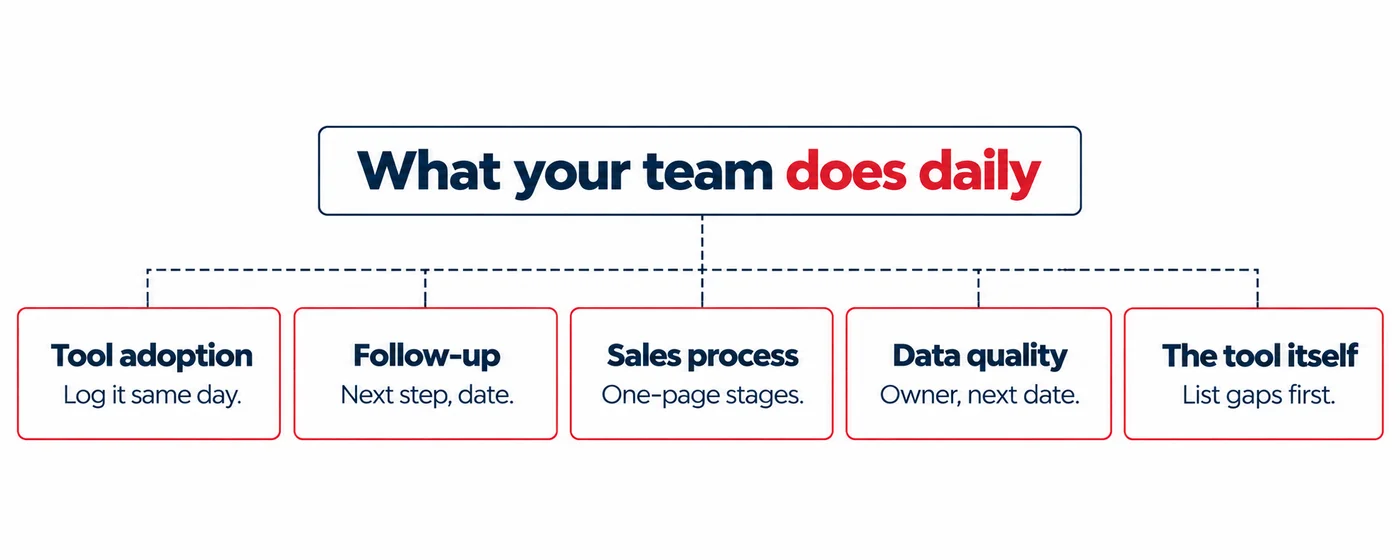
If your team does not log leads or logs them late, the problem is tool adoption. Log every lead the same day. If deals are on WhatsApp, sheets, or sticky notes, choose a single place for every lead. If it is not mentioned in the CRM, it does not count. Suppose a lead replies once and then goes quiet; you have missed the follow-up part. Put a next step and a date on every lead. If you do not have any plan for contacting a lead again, simply write when, how, and how many times.
In a team, leads should move at the same pace; if everyone moves leads their own way, and no one agrees on what a complete lead looks like, the sales process has an issue.
Having a lead without an owner or next date, or the same lead appearing twice, indicates a data quality issue. Here, the right approach is to make owner and next date compulsory.
If you see the CRM has become slow, and only one person can change it, or it is not linked to your email, the problem is the tool itself. List exactly what is missing before you act.
If you are not sure which row fits your team? A CRM audit can help you better to understand where the gaps are.
Where does Follow-up Leak in a CRM?
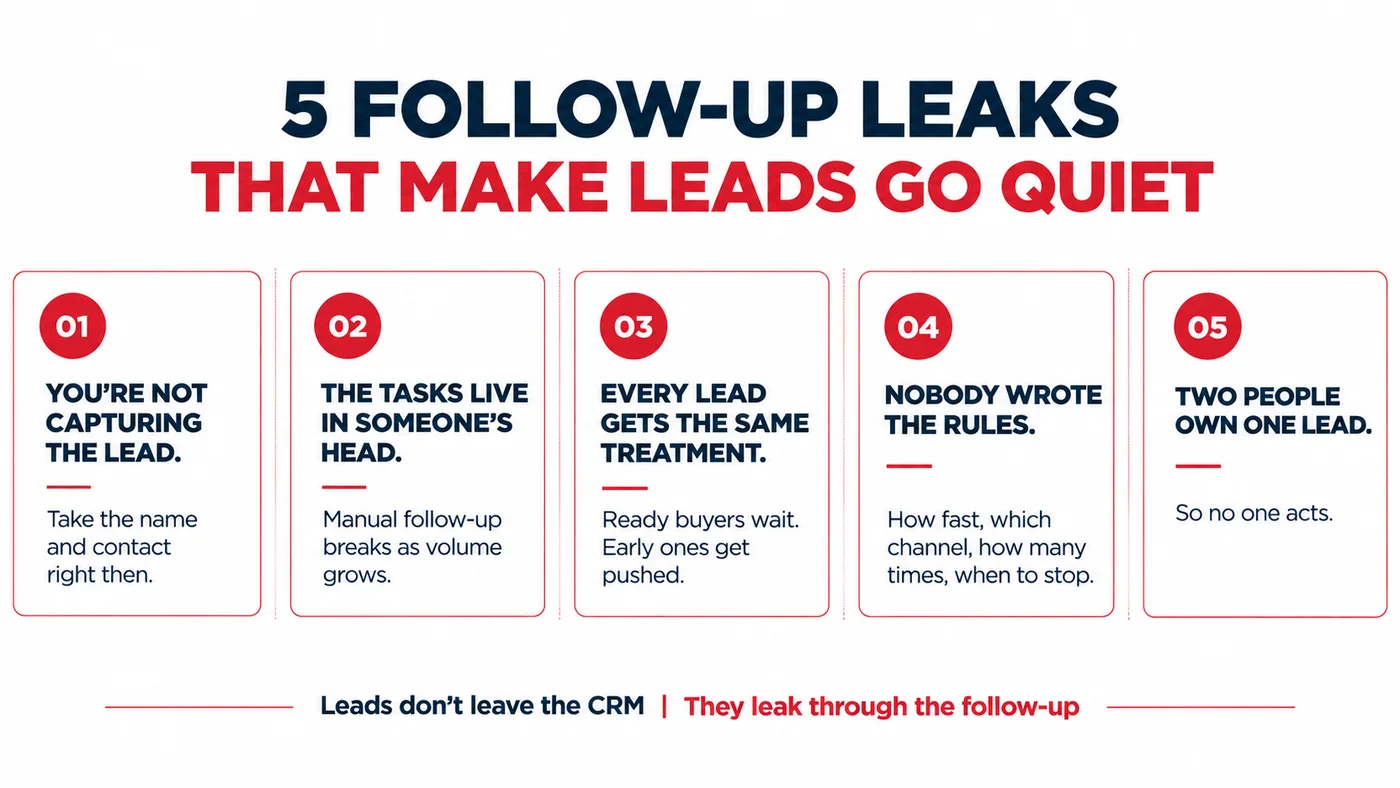
- Not Capturing Leads: Someone may visit your website, call you, or walk into your office. Take their name and contact details immediately. Try to offer something useful in return, like a guide, a checklist, or a discount.
- Manual tasks and disconnection: If a rep has to remember to create every task and check every handoff manually, the process becomes less reliable as volume grows. Consider integrating advanced tools to automate your CRM.
- Lack of segmentation: Every lead is different; some are ready to buy, and others are only gathering information. Both are valuable but require different handling. If the ready ones wait too long and the early ones get pushed too soon, both get quiet.
- Undefined response and rules: When the company does not have any fixed rules, everyone decides alone. Some leads get chased, and others get forgotten. For each type of lead, write down how fast to reply, which channels to use, how many times to reach out, and when to stop.
- Unclear ownership: When two people share a lead, each one thinks the other will act. In the end, no one does, and the lead waits. You can easily avoid this by giving every lead one owner the moment it enters the CRM.
How to Check CRM Follow-up in 10 Minutes?
Open your CRM and select your last five new enquiries. Now, ask five simple questions about each one.
1. How long did the first reply take?
Check the time of the enquiry and the time a person answered. An auto message like “we got your enquiry” is fine, but this is not a reply from your team. As per an InsideSales study across 55 million sales activities, there was up to eight times higher conversion when the first message came within five minutes. Check your reply time.
2. How many times did anyone try again?
Count the total number of calls and messages sent after the first reply. If you just send one reply and then silence, your lead slips away.
3. Who owned the next step?
Every enquiry should have one name, one action, and one date. If the CRM only states “Contacted”, no one knows the next step. The moment you get a form enquiry, the CRM should save the source, send a confirmation, assign a consultant and set a call task. Without that, the forms will just sit in a shared inbox, and the details stay untouched.
4. What did the last note say?
Read the latest note on every enquiry. It should clearly state what the customer said or needed. A note with a message like “Called – no answer” tells you nothing about the next step.
5. Does the source match the enquiry?
Check where each enquiry came from, such as the website form, an ad, or a referral. If the source is blank or wrong, you cannot tell which channel brings real leads. So work on your process and make it clear from the beginning: every lead should have one source and purpose.
If three of your five enquiries fail on the same question, you need to immediately work to fix that one first.
When Should I Switch My CRM?
Before you change your CRM, follow the steps in the image below to find the real reason it is not working.
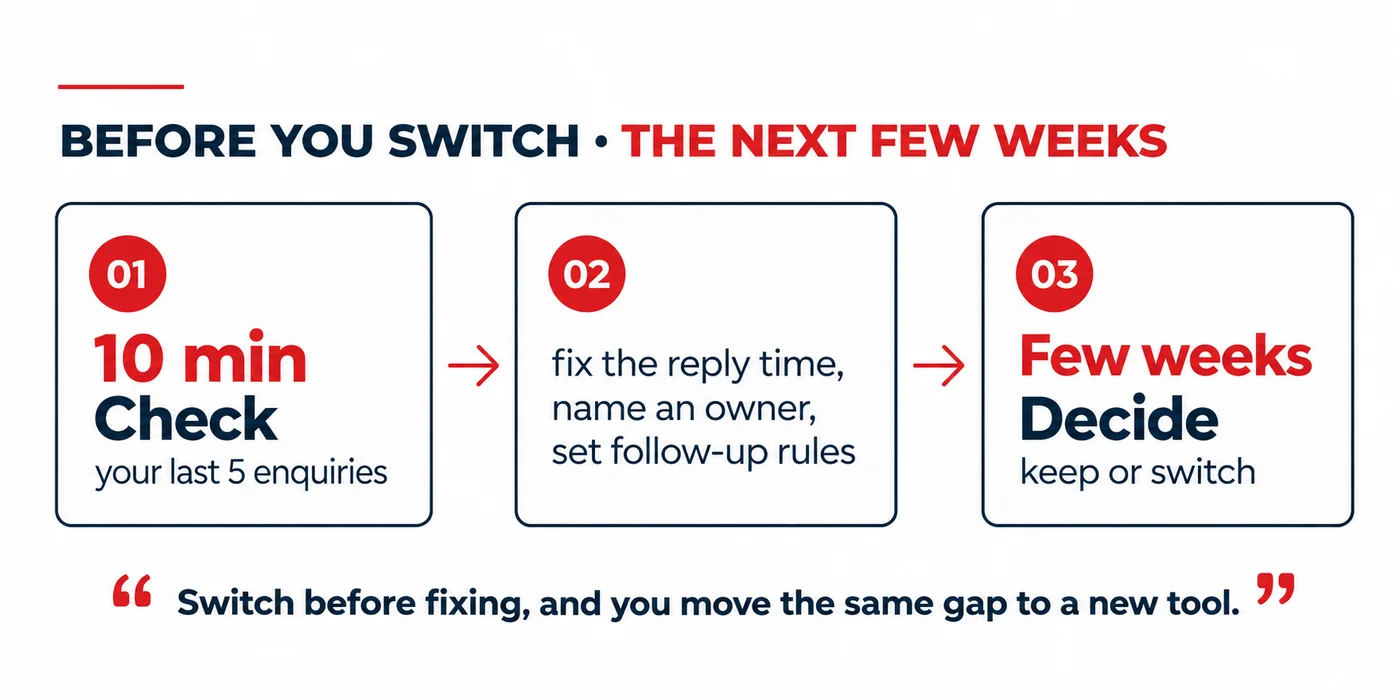
First, streamline your entire sales process and make the required changes. Before switching, fix the reply time, the next-step owner, and the follow-up rules, and then check the results. If the leads still slip, then the tool may be the actual reason.
If you switch before that, you will actually transfer your gap to a new tool.
Frequently Asked Questions
Why is my CRM not working?
A CRM may stop working if the process around it is not clear. Leads may not be logged, first replies may be slow, and no one may own the next step. First, work on these gaps, then check the tool.
Why do leads go cold after CRM setup?
A CRM can store the lead details, but it cannot talk to them. After the setup, replies slow down, reminders are missed, and no one owns the next step. The lead waits, loses interest, and finally moves on.
How fast should we follow up with a new lead?
Follow up as fast as your team can do well; the ideal time range is within 5-10 minutes during office hours. Select a time that fits your team, note it, and check it every week.
What is the best way to follow up with a customer?
The best way to follow up with a customer is to use their preferred channel, like a call, WhatsApp, or email. Keep each message short and useful, with one clear question. Try sharing something helpful, not a pitch.
How many follow-up attempts should a sales team make?
There is no fixed number. Many teams make four to six follow-up attempts over 2-3 weeks, through calls, messages, and emails. You can stop when the lead says no or asks to wait. Select a number that fits your sales cycle and mention it in your CRM.
Should I switch my CRM or fix my follow-up?
Fix your follow-up first. Set a reply time, name an owner for every lead, and also add reminders. Check after a few weeks: if leads still slip because the tool cannot work as per the process, then switch. Otherwise, you will move the same gaps to a new tool.
Filed under
- CRM adoption
- Lead follow-up
- Sales process