
WhatsApp CRM integration means connecting your WhatsApp Business account to your CRM. It saves every chat next to the customer’s record and assigns an owner, a reply deadline, and a follow-up date. This is the best method for B2B teams to stop losing leads in chat. Here is how it works and how to set it up.
A buyer messages on WhatsApp at night, and no one owns the reply. By morning, they have moved to another option. The team loses this lead because there was no system around the chat.
Key Takeaways
- WhatsApp CRM integration saves every chat, contact details, and history.
- B2B businesses lose leads when chats stay on phones with no owner.
- Give every new enquiry one owner, a reply-time target, and a recorded lead source.
- Free replies work only within 24 hours, so keep approved follow-up templates ready.
What Does WhatsApp CRM Integration Mean for a B2B Team?
WhatsApp CRM integration means connecting your WhatsApp Business account to your customer database. When someone texts your business on WhatsApp, that communication, along with their contact details and interaction history, saves automatically in your CRM. Your team can see everything in one place: WhatsApp chats with email threads, purchase records, and support tickets. If you are not sure where your leads are dropping off, a CRM audit can show you.
Why B2B Leads Get Lost in WhatsApp Chats
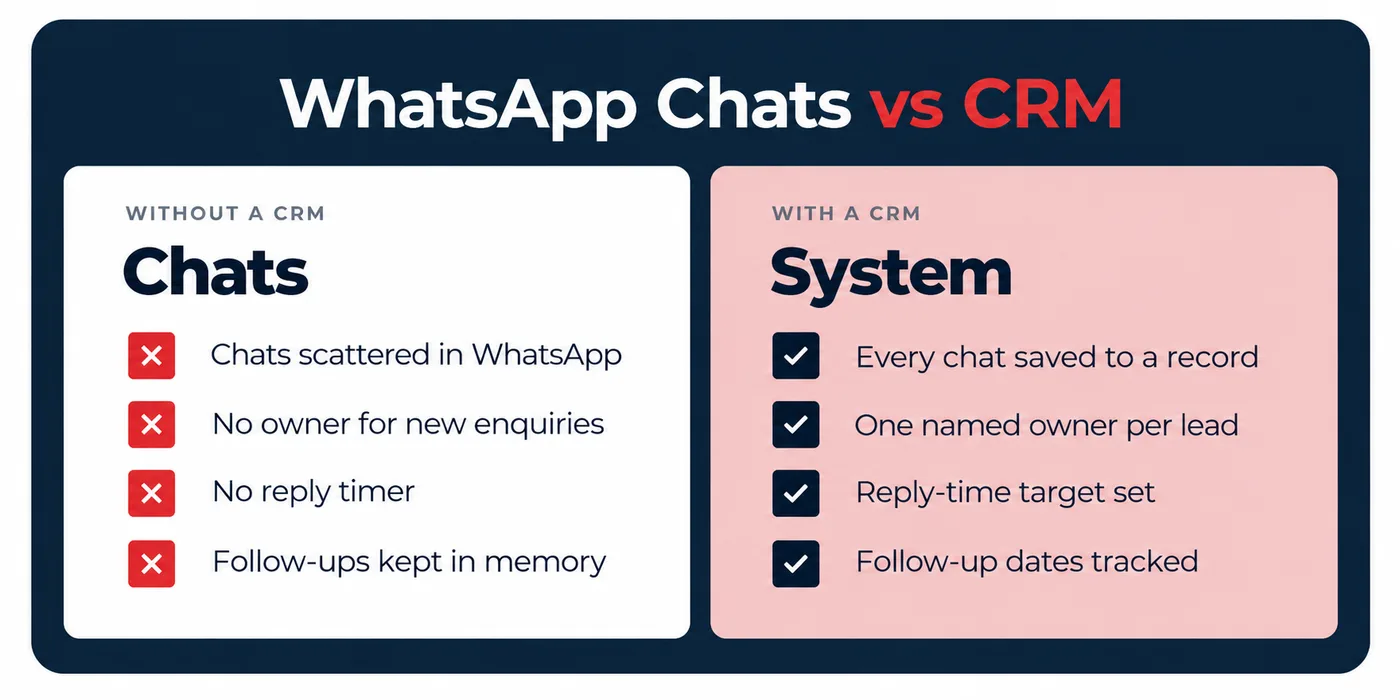
Most B2B businesses lose leads because they lack a strong system around the chat. Conversations happen on personal phones, so the history disappears when the salesperson does. They lack ownership, a reply timer, and a way to track where the lead came from. Follow-ups live in memory, and managers can’t see what is actually pending. These are process gaps, and a CRM integrated with WhatsApp avoids them. Marketing often has the same gaps, which is why you need a marketing audit before hiring anyone.
How Does a WhatsApp Chat Become a Lead in Your CRM?
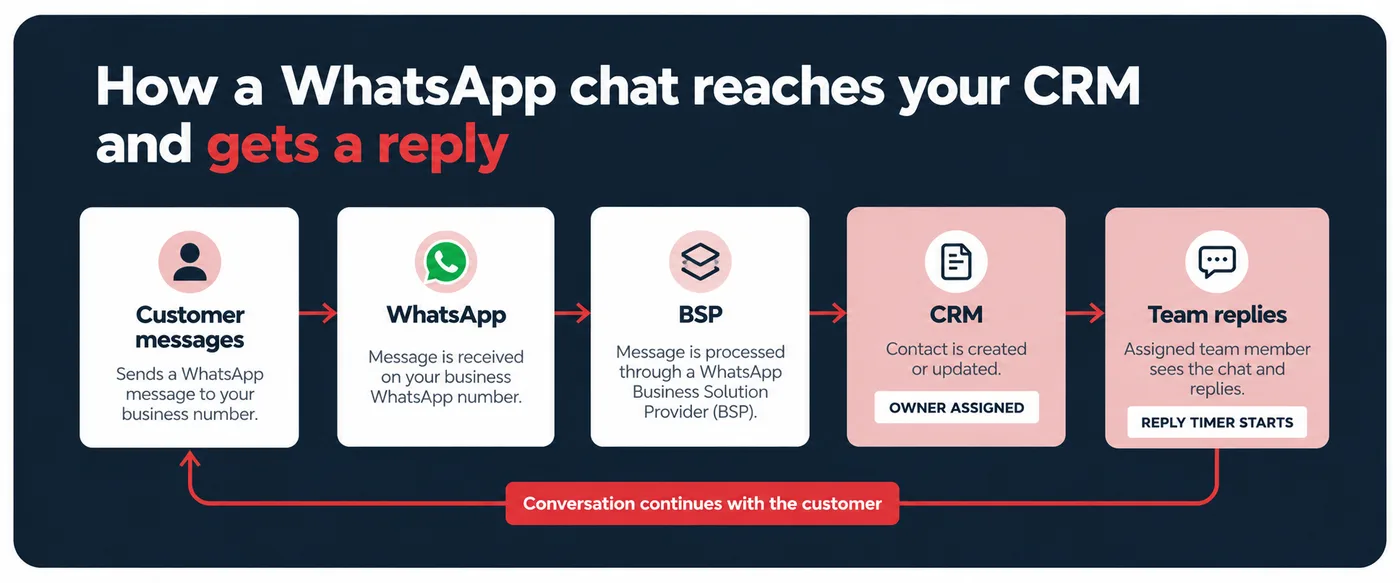
WhatsApp CRM works as a three-way conversation between WhatsApp, your integration platform, and your CRM. Here’s the process when a customer messages you:
Step 1: Customer sends a message
A customer messages your WhatsApp Business asking about a service. That message hits WhatsApp’s servers first.
Step 2: WhatsApp notifies your platform
WhatsApp immediately forwards the message data to your Business Solution Provider (BSP).
Step 3: Integration platform translates the data
As the BSP receives the message, it converts it into a format the CRM understands.
Step 4: Data flows into your CRM
The CRM receives the translated data. If the customer already exists in the system, their record updates with the new conversation. If they’re new, the integration creates a new contact automatically.
Step 5: Your team responds
When your agent replies from the CRM, the process reverses.
Benefits of Connecting WhatsApp to Your CRM
Connecting WhatsApp to your CRM turns chats into customer records that your team can see, work on, and measure:
- Faster Response With Context: Traditionally, a customer messages on WhatsApp asking about a delayed shipment. The agent first asks for their order number, searches the system, and stays active throughout the entire journey. WhatsApp CRM integration loads the context instantly. The agent can easily see the WhatsApp message in the CRM, along with the email complaint, order details, the reason, and the compensation offered.
- Get All Leads: Integrated WhatsApp and CRM can capture every WhatsApp lead in your CRM, along with the full communication history. Your sales team can see all prospects at a glance, prioritise based on intent signals, and no lead slips.
- Measure the Revenue Drivers: After the WhatsApp CRM integration, every WhatsApp conversation is measured. The broadcasts that drove purchases, revenue attributed to WhatsApp versus email versus SMS, conversion rates by message type, customer lifetime value by acquisition channel, and ROI. To check the rest of your marketing the same way, read how to know if your marketing is working.
- Scale Your Team: Integration provides personalised support. A customer asks about your business hours; your chatbot provides the correct details pulled from your CRM. Suppose a customer asks a question that your bot can’t handle; it moves to a human agent who can check the full conversation history and pick up.
How to Track WhatsApp Leads in Your CRM
Here is the quick process to track WhatsApp leads in your CRM:
- First: Name one person for each new enquiry. A chat with no owner can easily lose the lead.
- Second: Get WhatsApp Business API access, because the regular WhatsApp Business app does not connect fully with a CRM.
- Third: Save the key details like name, company, phone number, lead source, what they need, and the current stage.
- Fourth: Let the CRM assign new chats automatically and set a reply time, like within 15 minutes during working hours.
- Fifth: WhatsApp allows free replies only within 24 hours of the customer’s last message. Prepare the templates for follow-ups, reminders, and quotes.
Bottom Line
WhatsApp CRM integration plays a crucial role in stopping the loss of B2B leads with instant communication, personalised messages, and seamless automation. Businesses can enhance their overall lead experience and keep prospects engaged throughout the entire journey.
Frequently Asked Questions
What is CRM WhatsApp integration?
WhatsApp CRM integration stops B2B leads from slipping away by giving every chat a record, an owner, and a next step. Faster replies, personalised messages, and clear follow-ups keep prospects engaged from the first message to the close.
How does WhatsApp integration reduce lead drop-offs?
WhatsApp CRM for B2B reduces lead drop-offs in three ways: leads get faster replies, messages are personalised through the CRM, and every new enquiry is assigned an owner, so no lead is left waiting.
How does WhatsApp CRM integration work?
It connects your WhatsApp Business account to your CRM. So when you get any lead messages, the CRM creates or updates their profile automatically and saves the chat. Your team can check the full history, assign the lead, and reply from one place.
How do you integrate a CRM with WhatsApp?
To integrate WhatsApp and CRM, get WhatsApp Business API access through an approved provider, then link it to your CRM, set lead assignment rules, and add approved message templates. It is better to test with a few real enquiries before rolling it out to your team.
How do you manage WhatsApp leads?
Treat WhatsApp enquiries like any other lead. Log each lead’s details in the CRM, assign an owner, and track it through the same process. Reply quickly, set a follow-up date after every conversation, and also note the lead source.
Filed under
- WhatsApp CRM
- Lead management
- CRM integration